Architecture
MDMongoose is a set of Databricks resources around one Delta table. There is no extra database, cache or server: the UI runs as a Databricks App, the work runs on serverless compute, and Unity Catalog governs every table and grant.
In your lakehouse
MDMongoose sits between the silver and gold layers of a medallion architecture, as a separate component next to your data pipelines:
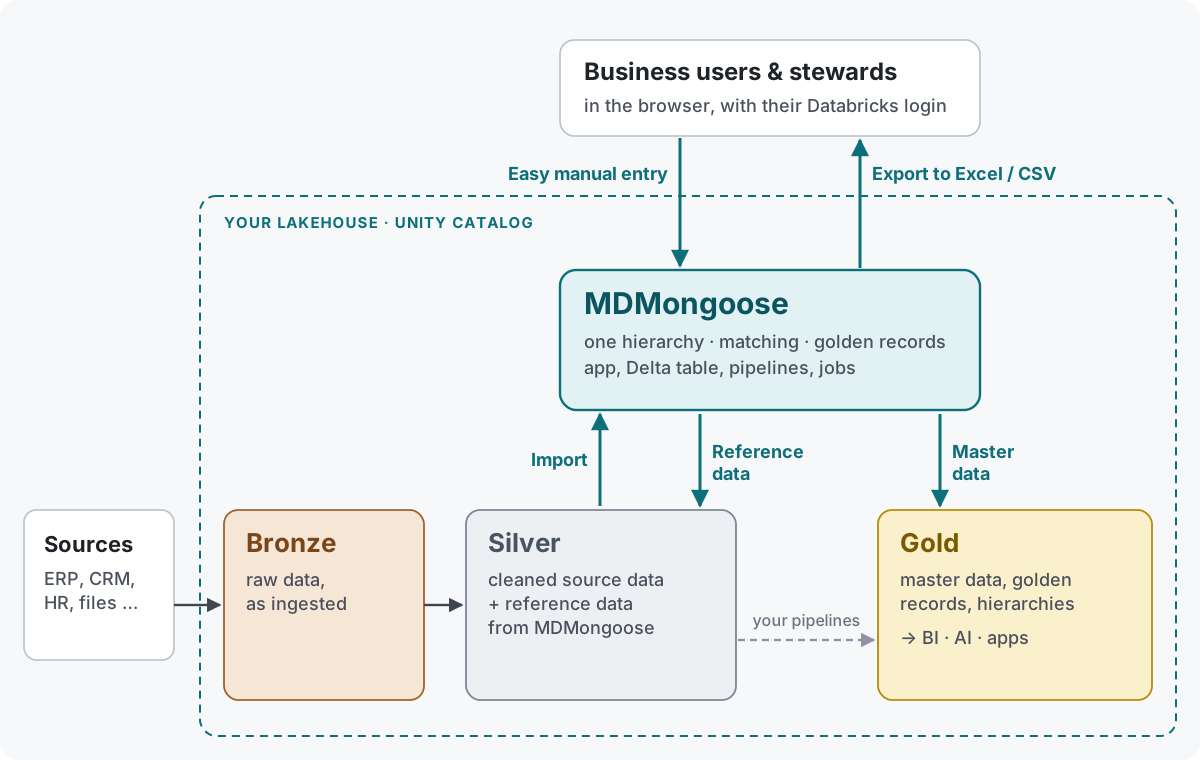
| Flow | From → to | How |
|---|---|---|
| Import | Silver → MDMongoose | Cleaned source tables with change data feed (mdm_staging.src_*) are loaded incrementally by the mdm_load pipeline and job. → Ingestion |
| Reference data | MDMongoose → Silver | Reference data maintained in MDMongoose (countries, product groups, mappings) is published as Export nodes, so silver pipelines can join and standardise with it. → Export |
| Master data | MDMongoose → Gold | Golden records and hierarchies are published as materialized views or views in mdm_export, ready for BI, AI and apps. → Export |
| Manual entry | Business users & stewards → MDMongoose | Users edit nodes, hierarchies and golden records in the app, one node at a time or in the Excel-like Edit Children grid. → User guide |
| Excel / CSV | MDMongoose → Business users & stewards | Any branch can be downloaded from the app as CSV or Excel; Export nodes also write files to a volume. → Exporting to CSV and Excel |
Bronze stays untouched: MDMongoose only reads data that your pipelines have already cleaned into silver.
Inside MDMongoose
The Databricks resources that make up MDMongoose and how they work together:
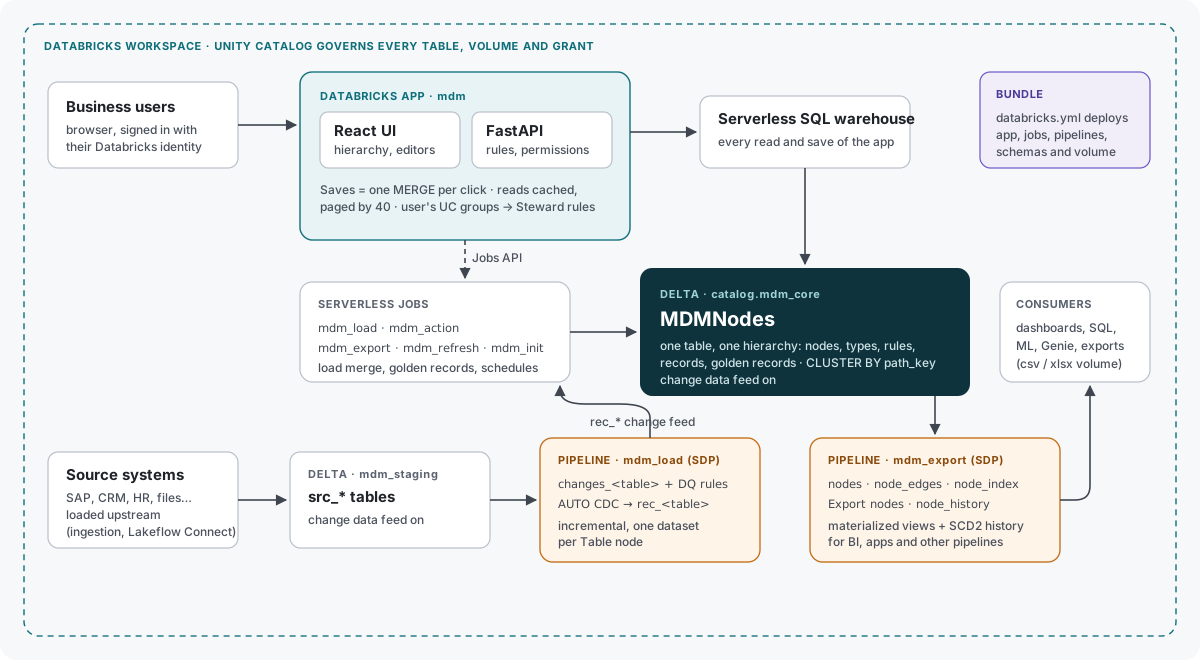
Components
| Component | Databricks resource | Role |
|---|---|---|
| UI + API | Databricks App mdm (React + FastAPI) | Hierarchy, properties, dialogs; enforces types, structure rules and permissions. Every save is one MERGE on the SQL warehouse. |
| SQL warehouse | Serverless (the starter warehouse on Free Edition) | Serves every read and save of the app. |
| MDMNodes | Delta table <catalog>.mdm_core.mdmnodes | The whole hierarchy: nodes, definitions, records, golden records. Change data feed and row tracking on. |
| Staging | Schema <catalog>.mdm_staging | Your source tables (src_*, change data feed on) and the pipeline's rec_* tables. |
| mdm_load pipeline | Spark Declarative Pipeline, serverless | One dataset per Table node: reads the staging change feed, applies expectations, AUTO CDC into rec_<table>. |
| mdm_load job | Serverless job | Refreshes the selected datasets, then merges the new changes into MDMNodes; optionally refreshes golden records. |
| mdm_action job | Serverless job | Golden-record refreshes and custom background actions; then runs mdm_export. |
| mdm_export job | Serverless job | Writes the CSV / Excel files of the Export nodes, then updates the export pipeline. |
| mdm_refresh job | Serverless job, hourly, paused by default | Loads every table whose Schedule is due. |
| mdm_init job | Serverless job | Creates or upgrades the table, seeds definitions and demo data, grants the app access. |
| mdm_export pipeline | Spark Declarative Pipeline, serverless | System views, history and one materialized view per Export node in <catalog>.mdm_export. |
| exports volume | UC volume in mdm_core | CSV / Excel files of the Export nodes. |
The data model
Every node is one row of MDMNodes:
- UID —
MDM-plus a base-36 number. Numbers up to 100 000 are reserved for system nodes; new UIDs are allocated in blocks, so many writers can work at once. - Structure —
parent_uid,path(the ancestor UIDs) andpath_key(the path as text, e.g./1/12W/1KE/). The table is clustered bypath_key, so a branch is a contiguous range of files: children, subtrees, moves and deletes read only their branch. - Node fields as columns — name, types, origin, icon, max child depth, allowed child types, owner, steward, locked, is_deleted, modified_at / modified_by.
- All other properties in one
propertiesVARIANT column, and auser_definedmap that marks values people set by hand.
Definitions are nodes too: a NodeType node holds its property definitions and actions; an Action node holds its Python handler and its Required Level; an Enum node's children are the values of the enum. The app reads them once and merges the definitions of a node's types.
How a save works
- The UI sends the change to the API.
- The API checks the rules: types, Allowed Child Type, Max Child Depth, the user's permission level, locks.
- One
MERGEwrites all changed rows — a whole Edit Children batch is one transaction. - If someone else changed the node since you opened it, the save is refused (HTTP 409) and you reload.
How a load works
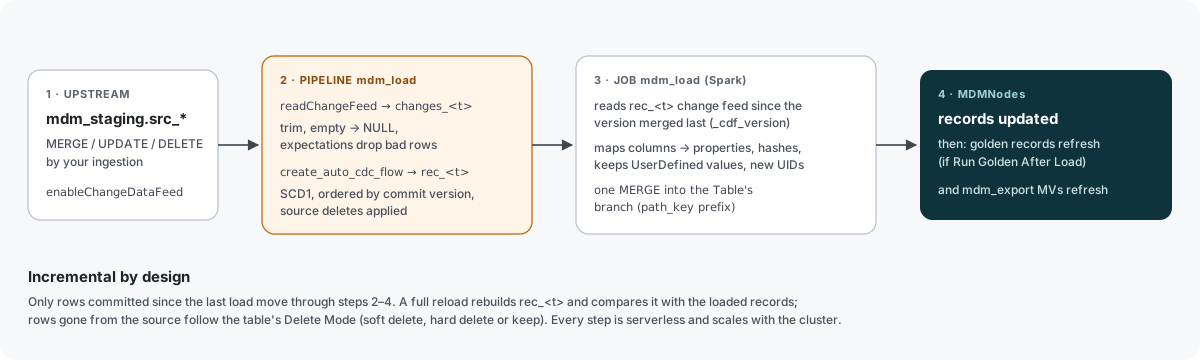
- Your ingestion writes to
mdm_staging.src_<name>(change data feed on). - Load Childs (or the schedule) starts the mdm_load job, which refreshes only that table's dataset in
the pipeline: the change feed is cleaned, checked against the table's expectations and applied to
rec_<name>with AUTO CDC. - The job reads
rec_<name>'s own change feed from the version it merged last and writes only those records with oneMERGEinto the Table node's branch — keeping every UserDefined value. - If the table has Run Golden After Load, the golden records that use it are refreshed; then the mdm_export job refreshes the Export nodes.
More on each stage: Ingestion, Data quality, Export.
Performance
- Paging: the UI reads 40 rows at a time; sort and filters run on the server.
- Caching: the browser keeps visited levels and preloads the properties of the rows on screen; the app caches reads and notices other writers through the table's Delta version.
- Set-based operations: deleting or moving a subtree is one statement, not one per node.
- Lookup index:
mdm_export.node_index(clustered by UID) finds any node by UID or name quickly.