Matching
Matching decides which source records describe the same entity. Its result is a set of clusters: every cluster becomes one golden record. The settings live on the Survivorship Rule node, in the Matching group.
| Setting | PropertyType | Meaning |
|---|---|---|
| Sources | Array(Table) | The Table nodes whose records are matched |
| Match Keys | Array(String) | Golden-record properties that identify an entity exactly, e.g. VAT ID |
| Match Threshold | Float (0–1) | The name similarity from which two records are the same entity, e.g. 0.8 |
Matching works on golden-record values, not on raw source columns: each record is first mapped through
the Source Mapping of the property rules (e.g. SAP STCEG → VAT ID, Salesforce VAT_Number__c → VAT
ID). So a match key or the name only takes part if a property rule maps it — see
Survivorship rules.
1. Exact match on keys
For each property in Match Keys, records whose values are equal belong together. Before comparing, the
value is normalised: spaces, dashes and dots are removed and letters are upper-cased, so de 123.456-789 and
DE123456789 match.
- Empty keys never match anything.
- With several keys, any equal key is enough (
VAT IDorDUNS). - Keys are compared across all records of all sources, regardless of country.
Good keys are tax numbers, DUNS numbers, LEIs, employee numbers — values that are unique per entity and
written the same way everywhere. A key that is sometimes wrong (a shared group VAT ID, a placeholder such as
N/A) merges unrelated records; clean it with an expectation on the table or an Eligible If condition.
2. Fuzzy match on the name
Records that share no key are compared by name: the golden property Legal Name, or Name if the type has no Legal Name.
- The name is normalised: lower case, punctuation removed, and legal forms dropped — GmbH, AG, Kft, Zrt, s.r.o., a.s., S.A., Ltd, Inc, LLC, BV, NV, plc, KG and similar — so ACME GmbH and Acme compare as equals.
- Only records of the same Country are compared with each other. Records without a country are compared with everyone.
- The similarity is a ratio from 0 (nothing in common) to 1 (identical), based on the longest common character sequences — it tolerates typos, missing words and different word order to a degree.
- A pair at or above the Match Threshold is one entity.
| Name A | Name B | Similarity |
|---|---|---|
| ACME GmbH | Acme | 1.00 (legal form dropped) |
| Globex AG | Globex Schweiz AG | 0.60 |
| Müller Logistik Kft. | Muller Logisztika | 0.88 |
| Initech | Initrode | 0.67 |
Matching is transitive: if A matches B by VAT ID and B matches C by name, A, B and C are one golden record.
Fuzzy matching only compares records whose Country value is the same text. If SAP says DE and Salesforce
says Germany, normalise the column in the staging table (or in the pipeline that fills it) so that both
use the same value — otherwise the two records are never compared by name.
Choosing the threshold
| Threshold | Effect |
|---|---|
| 0.95 – 1.0 | Only near-identical names merge. Safe; you will see more duplicates. |
| 0.85 – 0.9 | Typos and small differences merge. A good default when you also have keys. |
| 0.75 – 0.8 | Abbreviations and extra words merge. Check the near misses and the dry run carefully. |
| below 0.7 | Different companies with similar names start to merge. Not recommended. |
The demo uses 0.8 for customers, together with the VAT ID as key.
Checking the result: the dry run
Click Refresh Golden Records on the Master Data node. Before anything is written, the dialog shows every golden record with:
- the matched source records and the score of the cluster (the lowest name similarity that joined it; 1.00 for key matches);
- near misses: scored 0.60 against Globex Schweiz AG — below 0.80, kept separate. A near miss is a pair that came close to the threshold but stayed apart;
- the planned change: Create, Update, Unchanged, Retire.
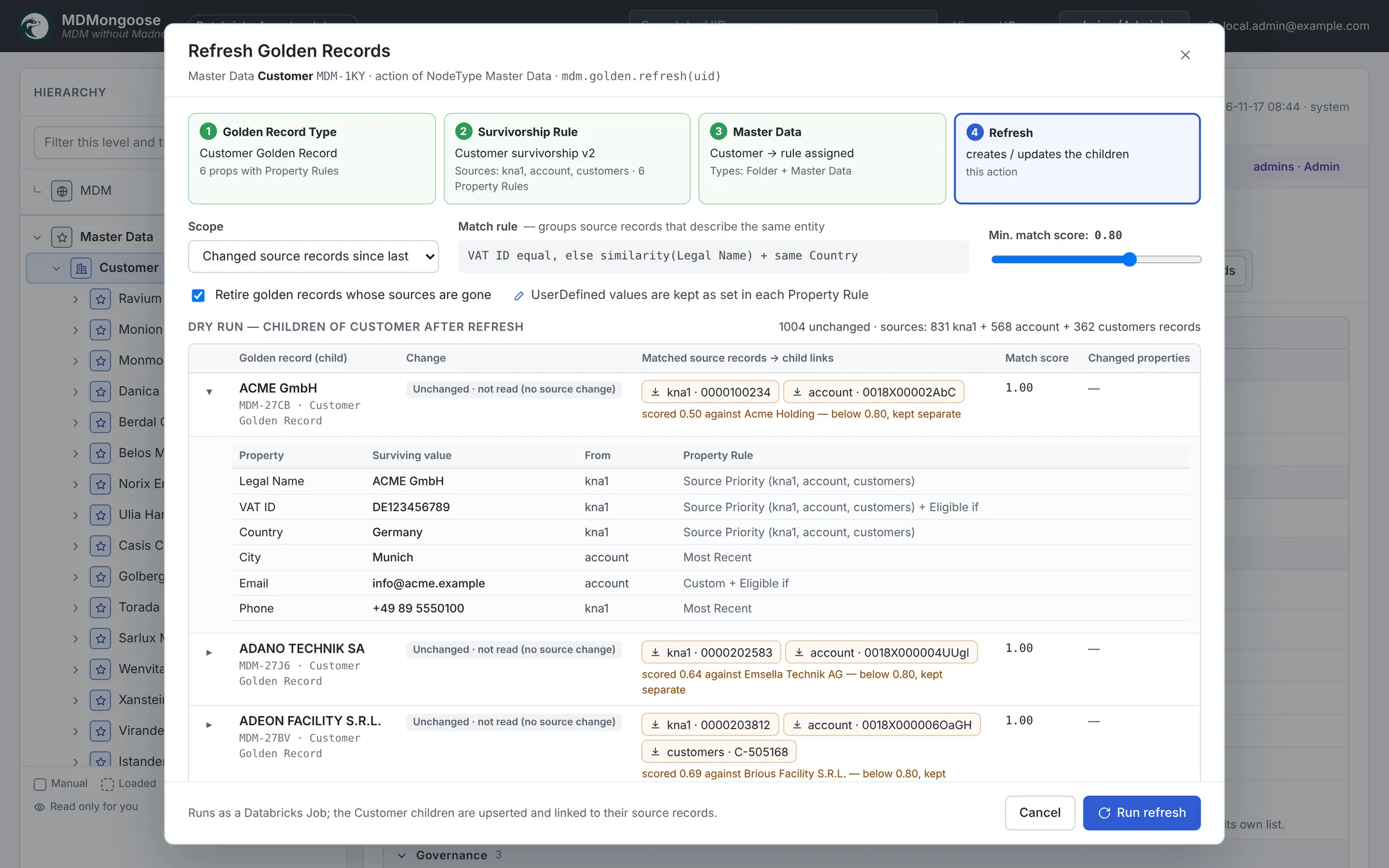
Use Min. match score in the dialog to try another threshold for this run only; it does not change the rule. When you are happy with it, set the rule's Match Threshold to the same value.
When matching gets it wrong
| Problem | Fix |
|---|---|
| Two entities merged | Raise the threshold; check the match keys for shared or placeholder values; make sure the countries differ where they should. |
| One entity split in two | Add a key (VAT ID, DUNS); lower the threshold a little; normalise the country or the legal name in the source. |
| One record in the wrong cluster | Correct the key or the name in the source, then reload; matching follows the data. |
The match score of each golden record is stored in Match Score, so you can review the weakest matches:
-- the demo Export node "Customer golden records" (a materialized view)
SELECT L1_Name, L1_Match_Score
FROM workspace.mdm_export.customer_golden_records
WHERE L1_Match_Score < 0.9
ORDER BY L1_Match_Score;
Next: decide which values survive → Survivorship rules.