Survivorship rules
After matching has grouped the source records of one entity, survivorship decides which value each golden-record property gets. Every property decides independently: the VAT ID can come from SAP, the e-mail from Salesforce and the phone number from whichever source changed it last.
A Survivorship Rule node holds the whole setup:
| Part | Where | Holds |
|---|---|---|
| Rule properties | the Survivorship Rule node | Golden Record Type, Sources, Match Keys, Match Threshold |
| Property Rules | children of the rule, one per golden property | Strategy, source order, Source Mapping, eligibility |
Create the rule
- Go to Model › Rules, click Add Child and choose the type Survivorship Rule.
- Set Golden Record Type to your golden type (e.g. Customer Golden Record) and Sources to the Table nodes to combine, e.g. SAP ECC · kna1, Salesforce · account, Webshop · customers.
- Set Match Keys and Match Threshold — see Matching.
- Click Edit Rule to define the property rules.
The rule editor
Edit Rule opens the editor: the golden properties on the left, the settings of the selected property in the middle, and a live preview on one real golden record below.
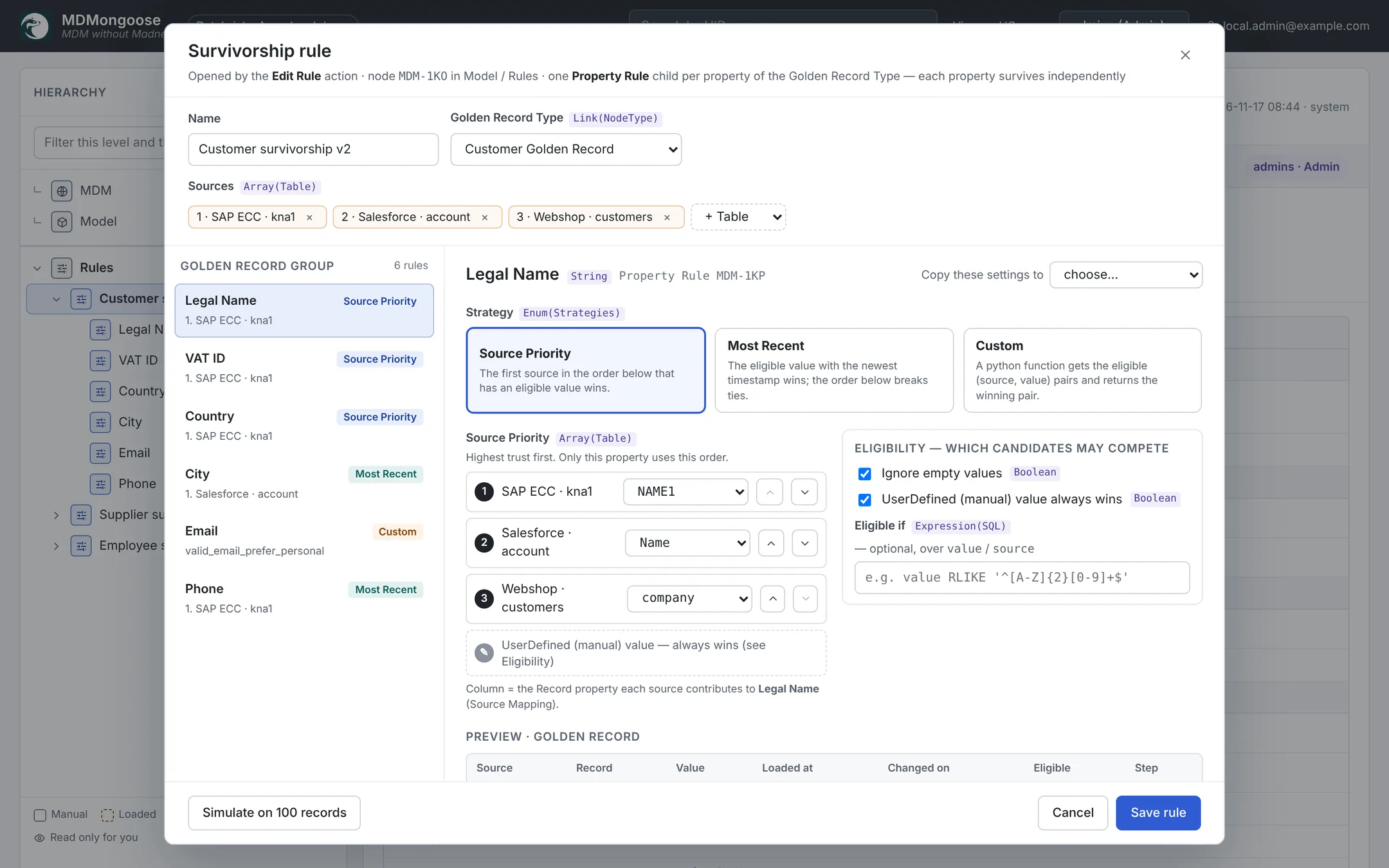
For each property:
Source mapping
Which column of each source feeds this property — e.g. Legal Name ← SAP NAME1, Salesforce Name,
webshop company. A source without a mapping does not take part for this property. Matching uses the same
mapping, so map the match keys and the name first.
Strategy
| Strategy | Picks | Good for |
|---|---|---|
| Source Priority | the value of the first source in the order that has an eligible value | Legal data where one system is the authority: legal name, VAT ID, bank details |
| Most Recent | the value that changed last; ties go by the order | Contact data that changes: phone, address, city |
| Custom | what your Python function returns | Rules that look at the values themselves: prefer a personal e-mail over info@ |
Source order — put the sources in order with the ↑ / ↓ buttons. For Source Priority it is the priority; for Most Recent the tie-breaker; for Custom the order in which the candidates reach your function.
Recency (Most Recent) — choose what "recent" means:
- Record · Loaded At — when the pipeline loaded the record. Simple, and works for every source.
- Source column · changed-on — a change-date column per source, e.g. SAP
AEDAT, SalesforceLastModifiedDate. More accurate when sources are loaded at different times.
Eligibility
| Setting | Effect |
|---|---|
| Ignore empty values | Empty values never win (on by default). |
| UserDefined (manual) value always wins | A value a person set on the golden record is kept, before the strategy runs (on by default). Off: the manual value competes as the last candidate. |
| Eligible if | A condition a value must meet to compete. |
Eligible if accepts a small, safe subset of SQL over value and source (the source table's name),
combined with AND / OR:
| Condition | Example |
|---|---|
value [NOT] RLIKE '…' | value RLIKE '^[A-Z]{2,3}[0-9]+$' — a VAT ID |
value [NOT] LIKE '…' | value LIKE '%@%' — looks like an e-mail |
value IS [NOT] NULL | value IS NOT NULL |
value = '…', value <> '…' | value <> 'N/A' |
length(value) op n | length(value) >= 5 |
source = '…', source <> '…' | source <> 'customers' OR value LIKE '%@%' |
A condition the editor cannot parse is shown as an error in the preview and ignored when the rule runs.
Copy settings
Copy these settings to applies the strategy, order, recency, function and eligibility of the current property to another property or to all of them — handy when most properties follow the same rule.
Custom functions
Custom functions live in the code, in src/mdm_custom/survivorship.py, so what can run is reviewed like any
other code. Every public function there appears in the Custom Function dropdown, with its source.
def valid_email_prefer_personal(pairs):
    """First valid e-mail that is not a generic mailbox; else the first valid one."""
    valid = [p for p in pairs if p[1] and EMAIL.match(str(p[1]).strip())]
    for p in valid:
        if str(p[1]).split("@", 1)[0].lower() not in GENERIC_MAILBOXES:
            return p
    return valid[0] if valid else None
- In: a list of
(source, value)pairs — only the eligible ones, in the source order. - Out: the winning pair, or
Nonefor no value. - Keep functions pure and fast: they run once per golden record and property.
Add a function, commit, deploy the bundle and redeploy the app; it then shows up in the editor.
Preview and simulate
- The preview shows, for one golden record, every candidate value with its source, record, load time, change date, whether it is eligible, and which one wins — and why (Source Priority: SAP ECC · kna1 is the highest-ranked source with an eligible value). Pick another golden record from the dropdown.
- Simulate on 100 records runs the whole rule on a sample and shows, per property, how often each source wins and how many values stay empty.
Nothing is saved until you click Save rule; the golden records change only on the next refresh.
The demo rule
Model › Rules › Customer survivorship v2 combines SAP, Salesforce and the webshop:
| Property | Strategy | Order | Eligible if |
|---|---|---|---|
| Legal Name | Source Priority | SAP, Salesforce, webshop | — |
| VAT ID | Source Priority | SAP, Salesforce, webshop | value RLIKE '^[A-Z]{2,3}[0-9]+$' |
| Country | Source Priority | SAP, Salesforce, webshop | — |
| City | Most Recent (Loaded At) | Salesforce, SAP, webshop | — |
Custom: valid_email_prefer_personal | Salesforce, webshop, SAP | value LIKE '%@%' | |
| Phone | Most Recent (Loaded At) | SAP, Salesforce, webshop | — |
Next: create the Master Data node and refresh → Master data records.