Master data records
Golden records live as children of a Master Data node. This page covers creating that node, refreshing the golden records, keeping them current, and working with them afterwards.
Create the Master Data node
- Go to Master Data and click Add Child.
- Choose the types Folder and Master Data, and name the node, e.g. Customer.
- Set:
- Survivorship Rule — the rule from Survivorship rules;
- Allowed Child Type — the golden record type, so nothing else ends up under it;
- Max Child Depth —
1keeps golden records directly under the node.
- Click Add child.
Refresh the golden records
Click Refresh Golden Records on the Master Data node.
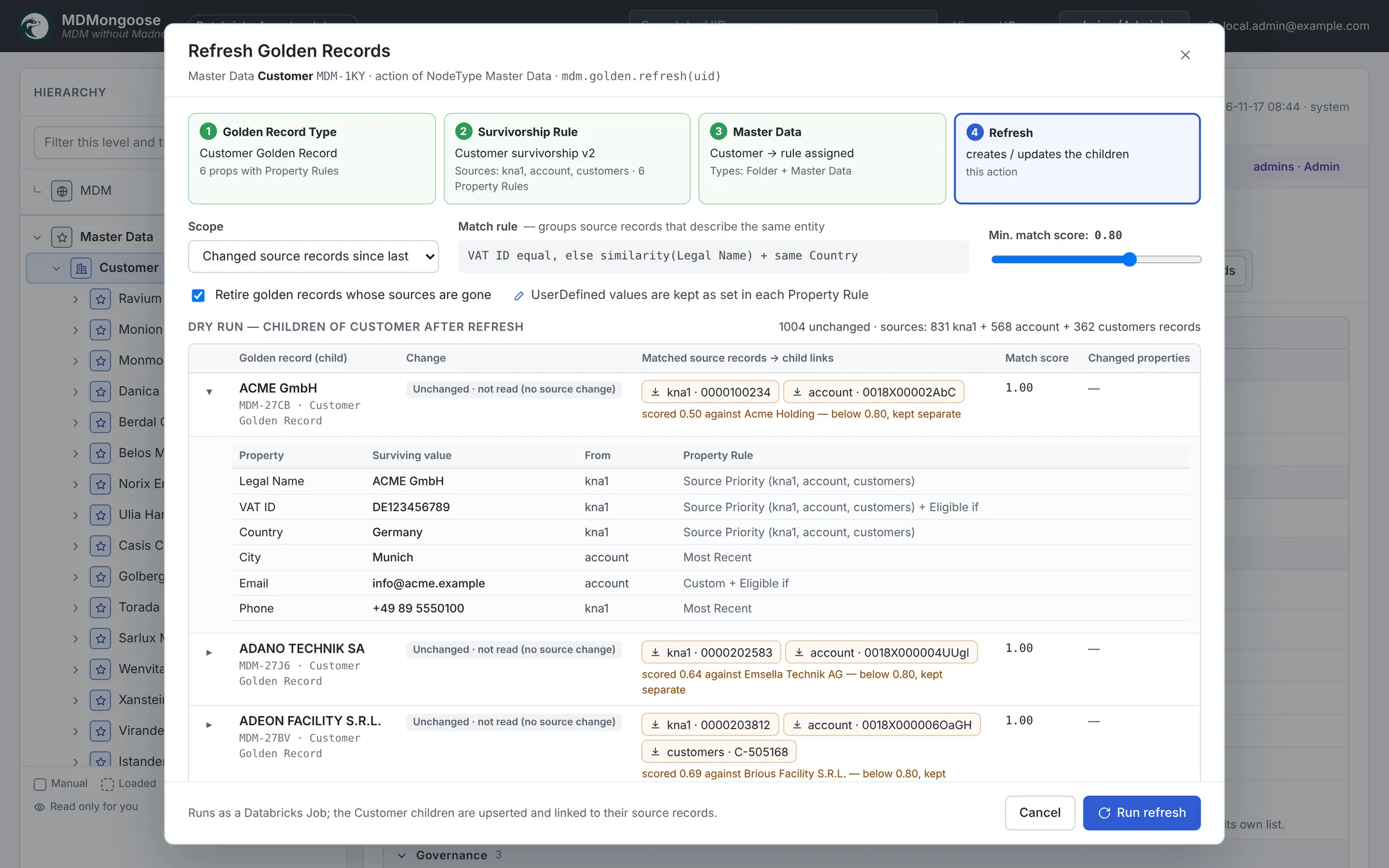
The dialog first checks the setup — the golden record type, the rule, the Master Data node and loaded source records each turn green when ready — then shows a dry run:
| Option | Meaning |
|---|---|
| Scope | Changed source records since last refresh, or Full rebuild (all source records) |
| Min. match score | Overrides the rule's Match Threshold for this run only |
| Retire golden records whose sources are gone | Soft-deletes golden records left without any source record |
Every golden record in the dry run shows its planned change, its match score, the matched source records, near misses, and every surviving value with the source and the rule that chose it:
| Change | Meaning |
|---|---|
| Create | A new entity — a new golden record is created |
| Update | Values or the set of source records changed; the changed properties are listed (City: Munich → München) |
| Unchanged | Nothing to write |
| Retire | No source records left; the golden record is soft-deleted (with Retire on) |
| Keep (orphan) | No source records left, but kept — Retire is off or the record is locked |
Conflicts are listed too: a surviving value that does not fit the golden property's PropertyType — for example a country name that is not in the Countries enum — is not stored, the golden record keeps its previous value, and the dry run says why. See Values that do not resolve.
Click Run refresh to apply it. The refresh runs as a serverless job; the dialog follows it and links to the run.
What a golden record contains
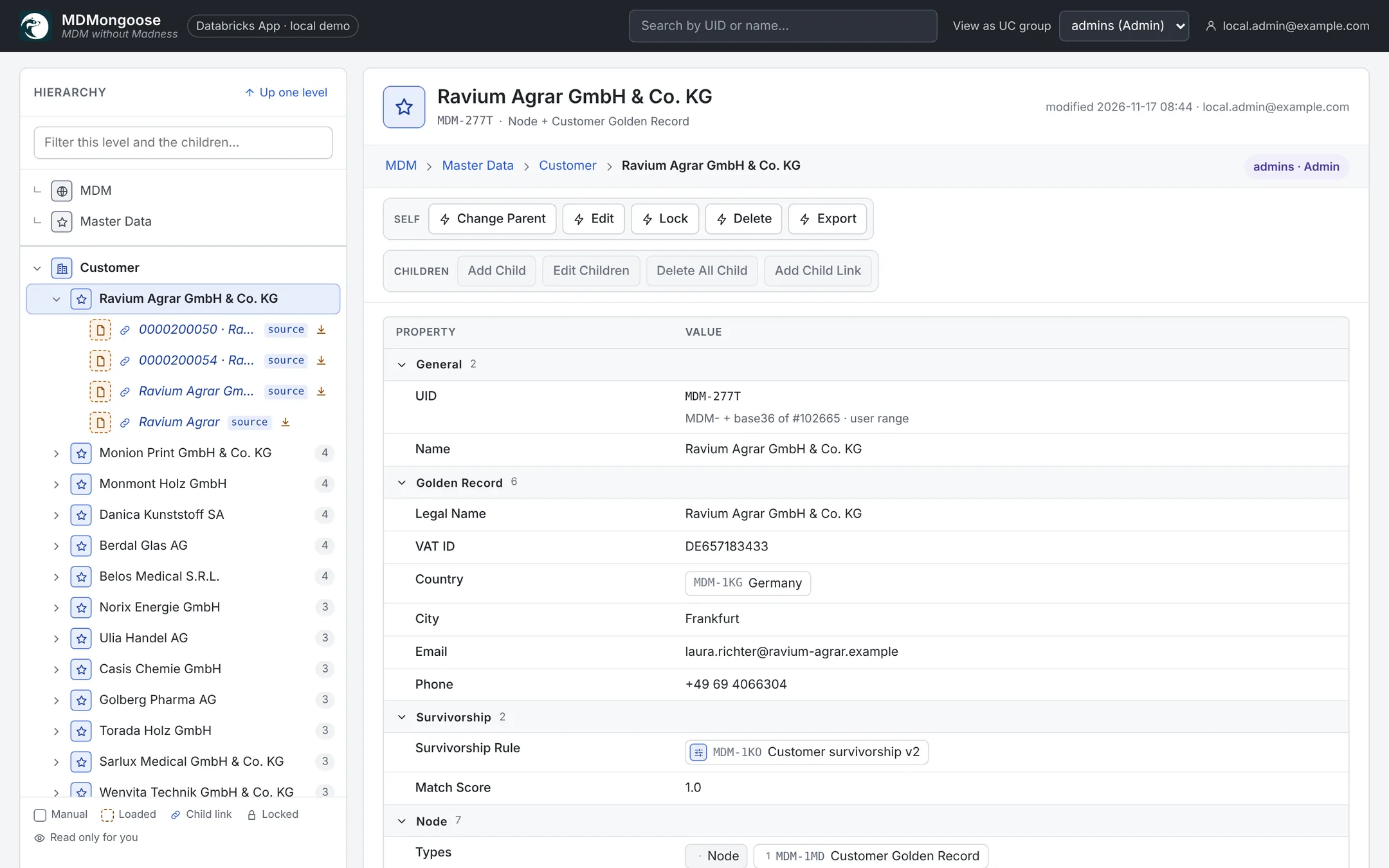
- The surviving values of the golden type's properties.
- Survivorship Rule — the rule that built it, and Match Score — the weakest name similarity in its cluster (1.00 when matched by key only).
- Child links of type
sourceto its source records. Expand the golden record in the hierarchy to see them; click one to open the source record in place. - Its Name is the surviving Legal Name (or Name), unless someone renamed it by hand.
Stable UIDs
A golden record keeps its UID across refreshes, so downstream systems can rely on it. On every refresh each new cluster is matched to the existing golden record that already owns most of its source records:
- a new source record joining a customer → same golden record, Update;
- two golden records whose sources now match each other → the larger one survives and takes over the source records; the other is retired;
- a cluster that splits → the larger part keeps the UID, the rest becomes a new golden record.
Keeping golden records current
- After every load — set Run Golden After Load on the Table nodes (Configure Load). Each load then refreshes the golden records of every Master Data node whose rule uses that table. The demo tables have it on.
- On a schedule — loads scheduled through the mdm_refresh job refresh the golden records the same way. See Importing data.
- By hand — Refresh Golden Records at any time, e.g. after changing the rule.
Correcting a golden record
Matching and survivorship get most records right; people fix the rest.
- Edit a golden record (or many in Edit Children) and change a value. The value becomes UserDefined and, with UserDefined wins on in the property rule, survives every later refresh.
- To hand a value back to the rule, click the property row and untick UserDefined; the next refresh sets it again.
- A wrong match is fixed at the source: correct the key or the name, reload — the next refresh regroups the records.
- Lock a golden record to keep it from being retired when its sources disappear. To protect a value from the refresh, use UserDefined as above.
Using the golden records
- Export a Master Data branch to CSV or Excel → Exporting to CSV and Excel.
- Publish them as a materialized view, view or file with an Export node → Exporting with materialized views. The demo's Customer golden records export is ready to query:
SELECT L1_UID, L1_Name, L1_VAT_ID, L1_Country, L1_Match_Score
FROM workspace.mdm_export.customer_golden_records
ORDER BY L1_Match_Score;