Overview of features
One hierarchy for everything
MDMongoose keeps all master data in one tree. At the top you find four branches:
| Branch | Holds |
|---|---|
| System | PropertyTypes, Actions, the system NodeTypes (Node, Folder, Ordered, Table, Record, Permission…) and Permissions |
| Model | Your NodeTypes, the record types of each source table, enums and the survivorship rules |
| Reference Data | Reference lists (countries, calendars…) and the records loaded from source tables |
| Master Data | Golden records and hand-maintained master data such as a product hierarchy |
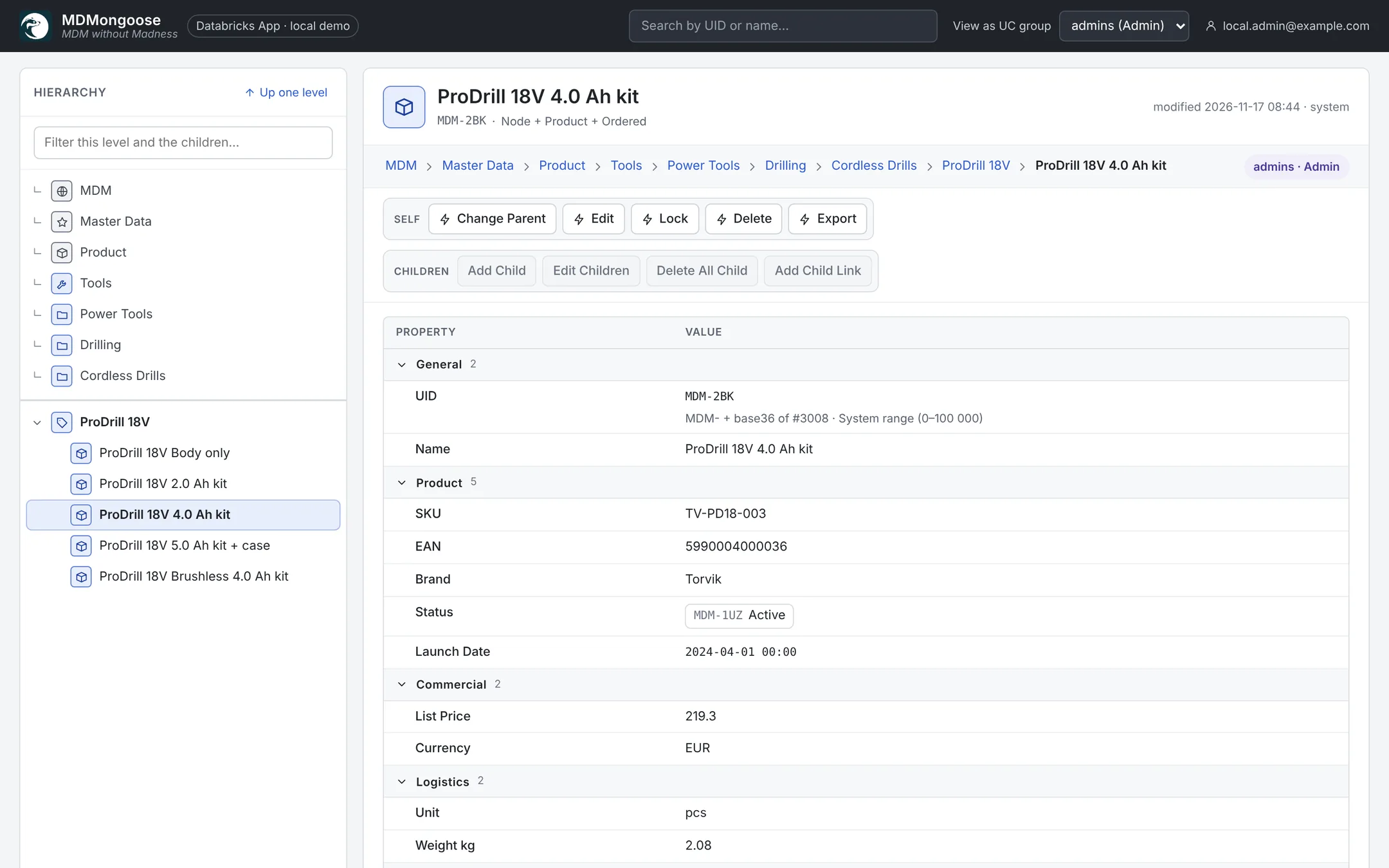
- NodeTypes work like interfaces. A node lists its types; its form is the union of their properties and its toolbar the union of their actions.
- Properties are typed — String, Number, Float, Boolean, Timestamp, Icon, Enum, Link to another node, Array of nodes or strings, SQL expressions — and grouped by Group and Priority.
- Structure rules keep branches clean: Allowed Child Type (the nearest list up the path wins) and Max Child Depth (checked against every ancestor).
- Child links show a node in a second place without copying it — for example a source record linked under its golden record.
- Fast on big trees: every level loads 40 rows at a time with Load next 40; visited levels and the properties of the rows on screen are cached, so navigation is instant.
Child Editor
Edit Children opens all children of a node in an Excel-like grid.
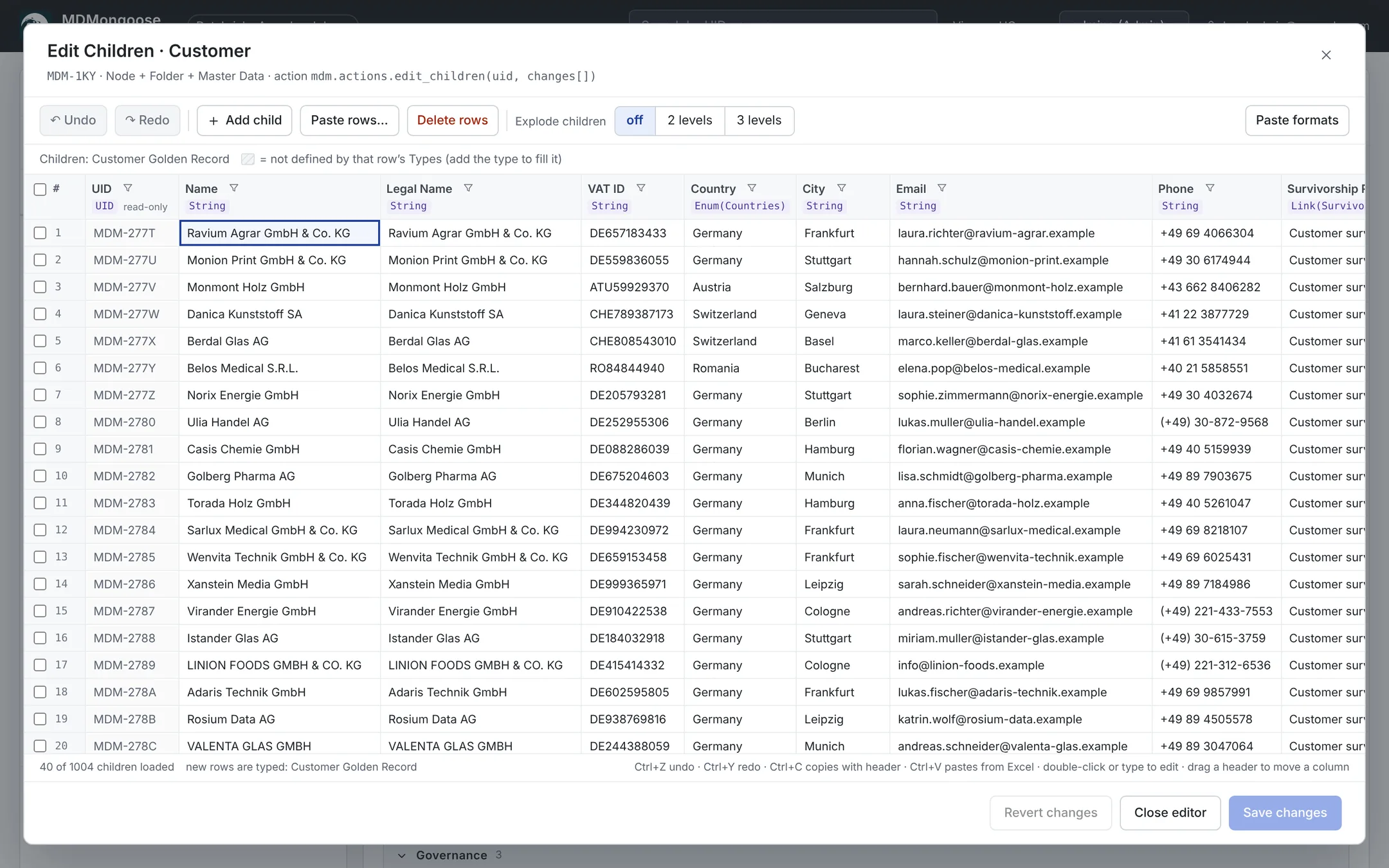
- Explode up to three levels (children, their children, below); parent cells repeat in grey.
- Copy with a header row, paste from Excel, Paste rows… to create many children at once.
- Server-side sort and filters over all children; filter menus list the values with counts.
- Invalid cells are red and block Save; Undo / Redo (Ctrl+Z / Ctrl+Y).
- Everything is saved in one transaction, with a conflict check if someone else saved first.
Databricks native
- Databricks App for the UI and the API; users sign in with their workspace identity.
- One Delta table (
MDMNodes) in Unity Catalog, clustered by the tree path. - Spark Declarative Pipelines for loading (
mdm_load) and exporting (mdm_export). - Serverless jobs for golden records, scheduled loads and background actions.
- One bundle (
databricks.yml) deploys the app, the jobs, the pipelines, the schemas and a volume.
See Architecture.
Incremental, distributed processing
Source tables are Delta tables with change data feed. Only the rows committed since the last load move
through the pipeline (AUTO CDC with data-quality expectations) and a distributed Spark MERGE writes them into
their branch of the hierarchy. Choose Incremental (change data feed) or Full reload per table, and run
loads on demand or on a schedule. See Importing data.
Matching & survivorship
Golden records are built from the records of several sources:
- Matching on keys (for example VAT ID or Employee ID), then on a fuzzy name within the same country, with an adjustable minimum score.
- Survivorship per property: Source Priority, Most Recent or a Custom Python function, with Ignore Empty and Eligible If conditions.
- A dry run shows every golden record, its matched source records and the surviving values before anything is written. See Creating master data.
Export
- CSV and Excel downloads of any branch with a live preview. See Exporting to CSV and Excel.
- Export nodes publish any branch as a materialized view (refreshed incrementally), a view or a CSV / Excel file on a volume — plus ancestor pairs, a lookup index and full SCD2 history. See Exporting with materialized views.
Governance
- Unity Catalog groups drive permissions with seven levels — Nothing, Reader, Modifier, Supervisor, Manager, Governor, Admin — set on any node through Steward lists. Every action has a Required Level. See Security.
- UserDefined values are protected from automatic updates.
- Locking protects definitions and loaded records from accidental edits.
- History: every change is in the Delta history and in the
node_historySCD2 table.