Export
Master data leaves MDMongoose in three ways, all built from the same exploded table of a branch — the node, its children, their children and so on, one row per deepest node, with the properties of each level as columns.
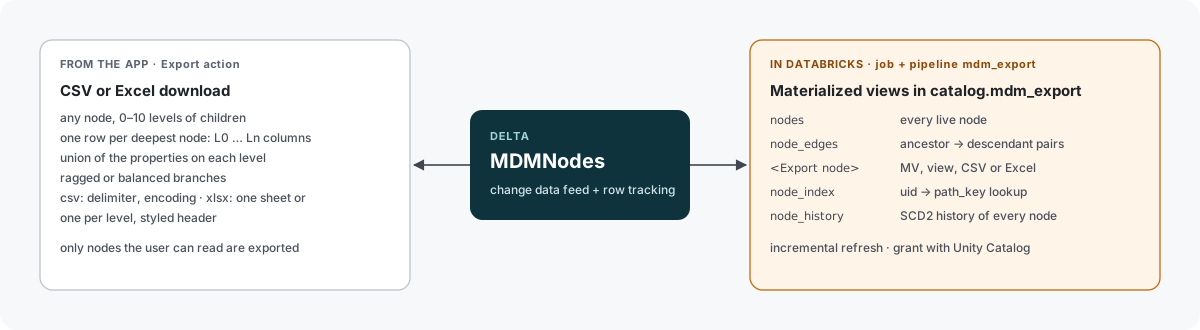
| Way | Built by | Lands in | Refreshed |
|---|---|---|---|
| Export dialog | the app, on request | your browser (CSV / Excel download) | when you click it |
| Export nodes | mdm_export job + pipeline, or the app (views) | mdm_export schema or the exports volume | after loads, golden refreshes, saves and Run Export |
| System views | mdm_export pipeline | mdm_export schema | with every mdm_export run |
Export nodes
An Export node (NodeType Export, under Model › Exports) saves the settings of the Export dialog and a target. Its properties:
| Property | Meaning |
|---|---|
| Export Type | Materialized view, View, Excel or CSV |
| Object Name | Name of the view in mdm_export, or of the file (a-z, 0-9, _; filled from the node name if empty). Checked when you save: it must not exist yet unless it is this node's own object. |
| Root Node | The branch to export (level L0) |
| Child Depth | How many levels below the root (0–10) |
| Balanced | none leaves missing lower levels empty; balanced repeats the deepest node |
| Include Properties / Include UIDs / Balanced Flag | As in the Export dialog |
| CSV Delimiter (CSV), Excel Sheets, Excel Header (Excel) | File options |
| Location, Last Run | Filled by MDMongoose: where the export is and what its last refresh did |
Columns are named like the dialog's headers with _ instead of . and spaces: L0_UID, L0_Name,
L0_Types, L1_Legal_Name, L1_Country, … Enum and Link values are exported as names, numbers,
booleans and timestamps as their SQL types.
What happens where
| Export Type | Created | Refreshed by | Object |
|---|---|---|---|
| Materialized view | by the mdm_export pipeline, after you save | mdm_export pipeline | <catalog>.mdm_export.<name> |
| View | by the app, when you save (and on Run Export) | — a view always shows current data | <catalog>.mdm_export.<name> |
| CSV / Excel | by the mdm_export job | mdm_export job | /Volumes/<catalog>/mdm_core/exports/<name>.csv / .xlsx |
Views are created by the app's service principal, so they always have one owner; the job leaves them alone. The node shows its generated SQL in the Definition group.
The mdm_export job
mdm_export (job, parameter uid = all | <Export node UID>)
 ├─ views_and_files   jobs/run_exports.py — writes the CSV / Excel files, sets Last Run on each node
 └─ export_pipeline   mdm_export pipeline — system views, node_history and one MV per Export node
It runs:
- after every load (
mdm_loadandmdm_refreshstart it when they finish), - after every golden-record refresh and custom background action (
mdm_actionruns it as its last task), - when you save an Export node of type Materialized view, CSV or Excel, or click Run Export,
- once from
mdm_init.
Runs queue: one refresh at a time.
Incremental refresh of the materialized views
Yes — Export nodes of type Materialized view are declared inside the mdm_export pipeline, which is
serverless, so Databricks refreshes them incrementally whenever the query allows it. MDMongoose generates a
query that stays within what incremental refresh supports:
MDMNodeshas row tracking, deletion vectors and change data feed on.- The branch is reached through joins on
uid/parent_uid(oneLEFT JOINper level) — no recursion, no aggregation, no window functions. - The branch filter is a
path_keyprefix, and type names come from a constant map — all deterministic. - Enum and Link names come from one
LEFT JOINper property.
What can still lead to a full recompute: branches with child links (the links are unnested with
explode), and anything Databricks decides is cheaper to recompute — for example when most of the branch
changed. New NodeTypes or properties on a level change the query; the pipeline redeclares the view at its next
update.
To see how each refresh ran, query the event log of the view:
SELECT timestamp, message
FROM event_log(TABLE(workspace.mdm_export.customer_golden_records))
WHERE event_type = 'planning_information'
ORDER BY timestamp DESC;
ROW_BASED or another technique means incremental; FULL_RECOMPUTE means the view was rebuilt; NO_OP
means nothing changed. The Tables panel of the pipeline shows the same per update.
System views
| Object | Kind | Contents |
|---|---|---|
nodes | materialized view | Every live node, one row per node |
node_edges | materialized view | Every ancestor → descendant pair with its distance |
node_index | materialized view, clustered by UID | UID → path and name; the app's lookup index |
node_history | streaming table | SCD 2 history of every node, from the change data feed of MDMNodes |
How to set up exports and give consumers access: Exporting with materialized views.