Edit Children
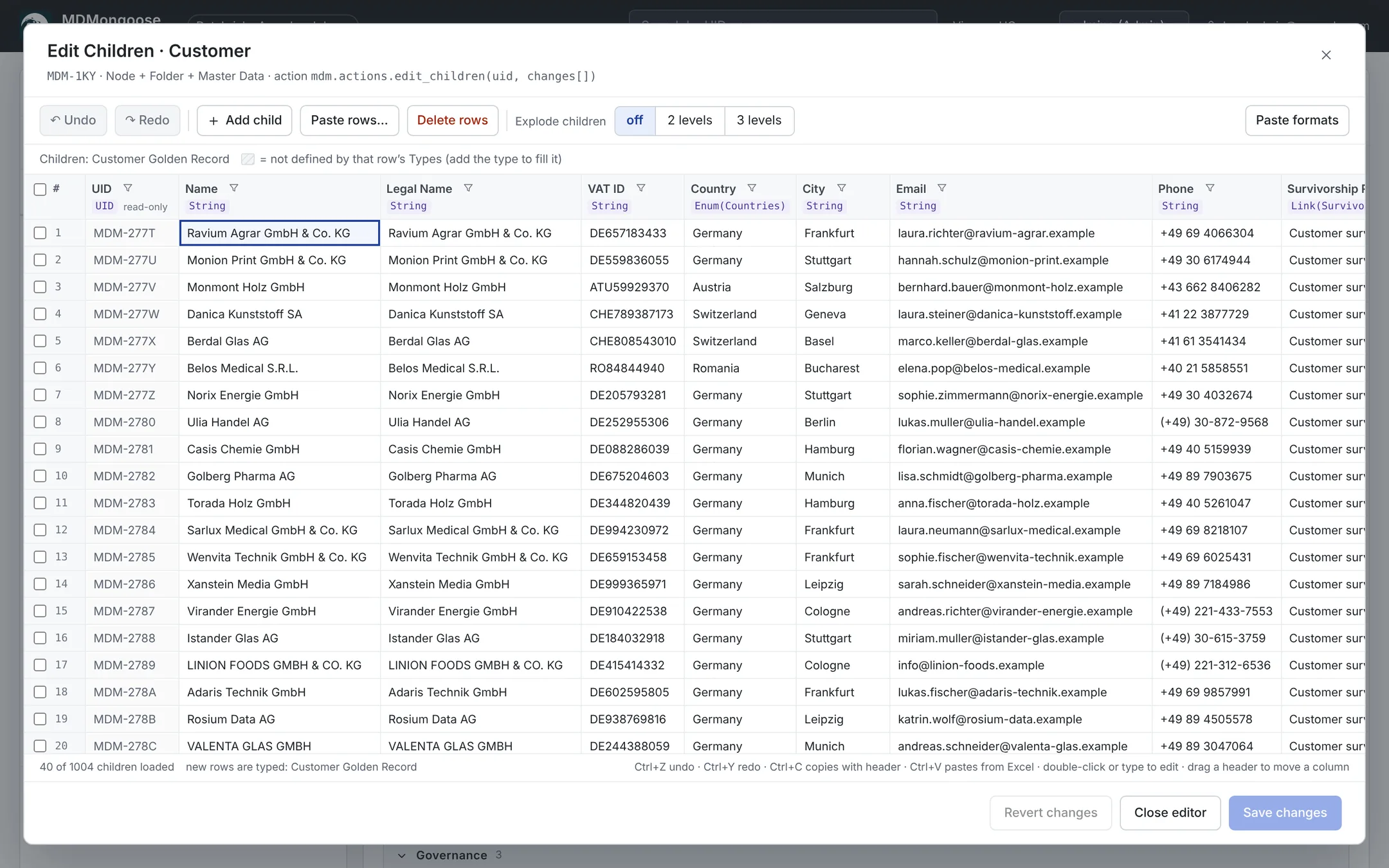
Edit Children opens all children of the selected node in an Excel-like grid. Nothing is saved until you click Save changes, and then everything is saved in one transaction.
To open it, select the parent node and click Edit Children in the Children action box. You need Modifier on the node to change values; adding and deleting rows needs Manager, and the Owner and Steward columns need Governor (see Security).
Columns and rows
- Columns are the union of the children's properties. A hatched cell means the property is not defined by that row's types — add the type to fill it.
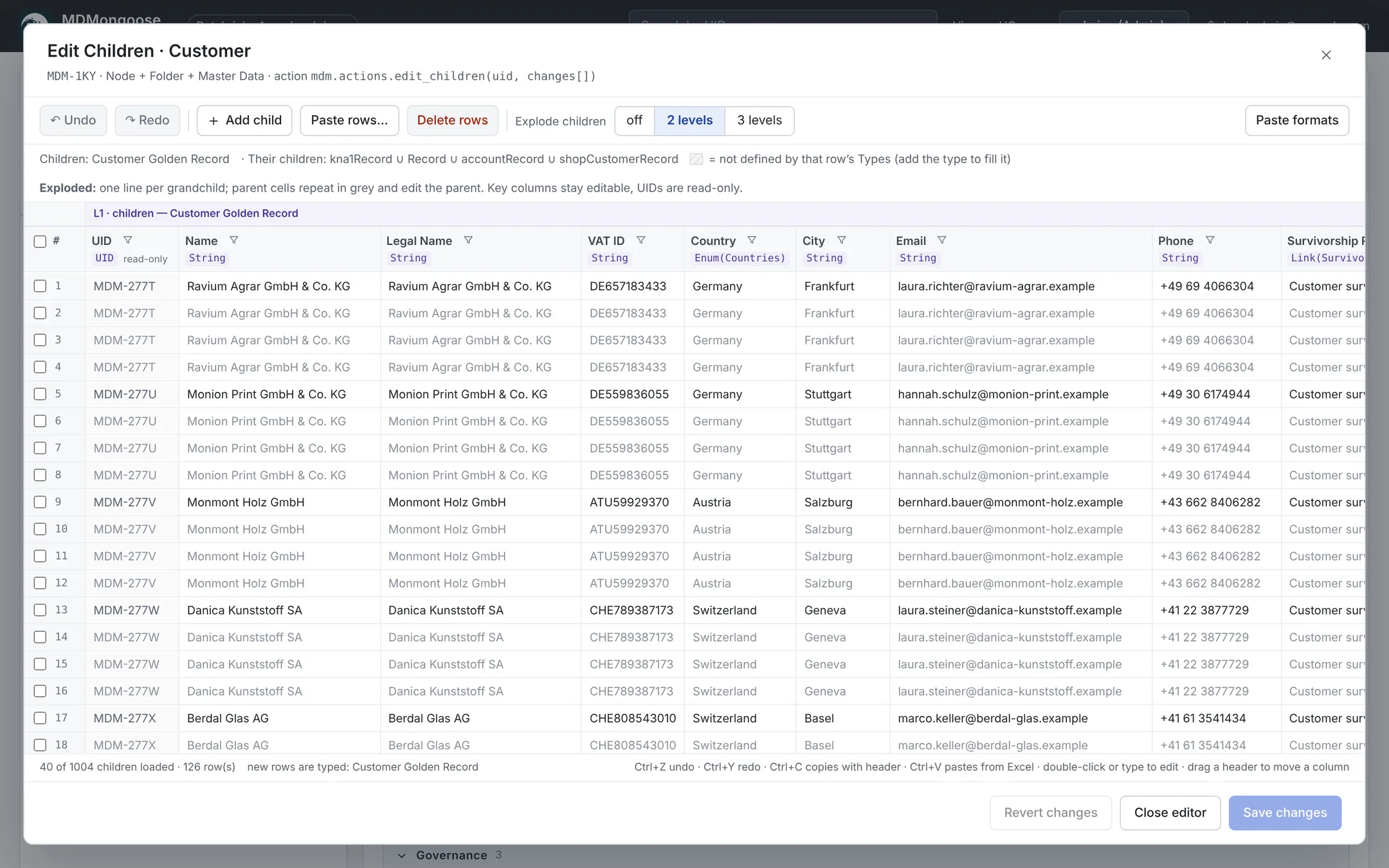
- Explode children: off, 2 levels or 3 levels. Each grandchild gets its own line; the parent cells repeat in grey and still edit the parent.
- The grid loads 40 children at a time; Load next 40 at the bottom loads more.
- Drag a header to move a column; Hide it from the column menu; hidden columns come back from the toolbar.
Sorting and filtering
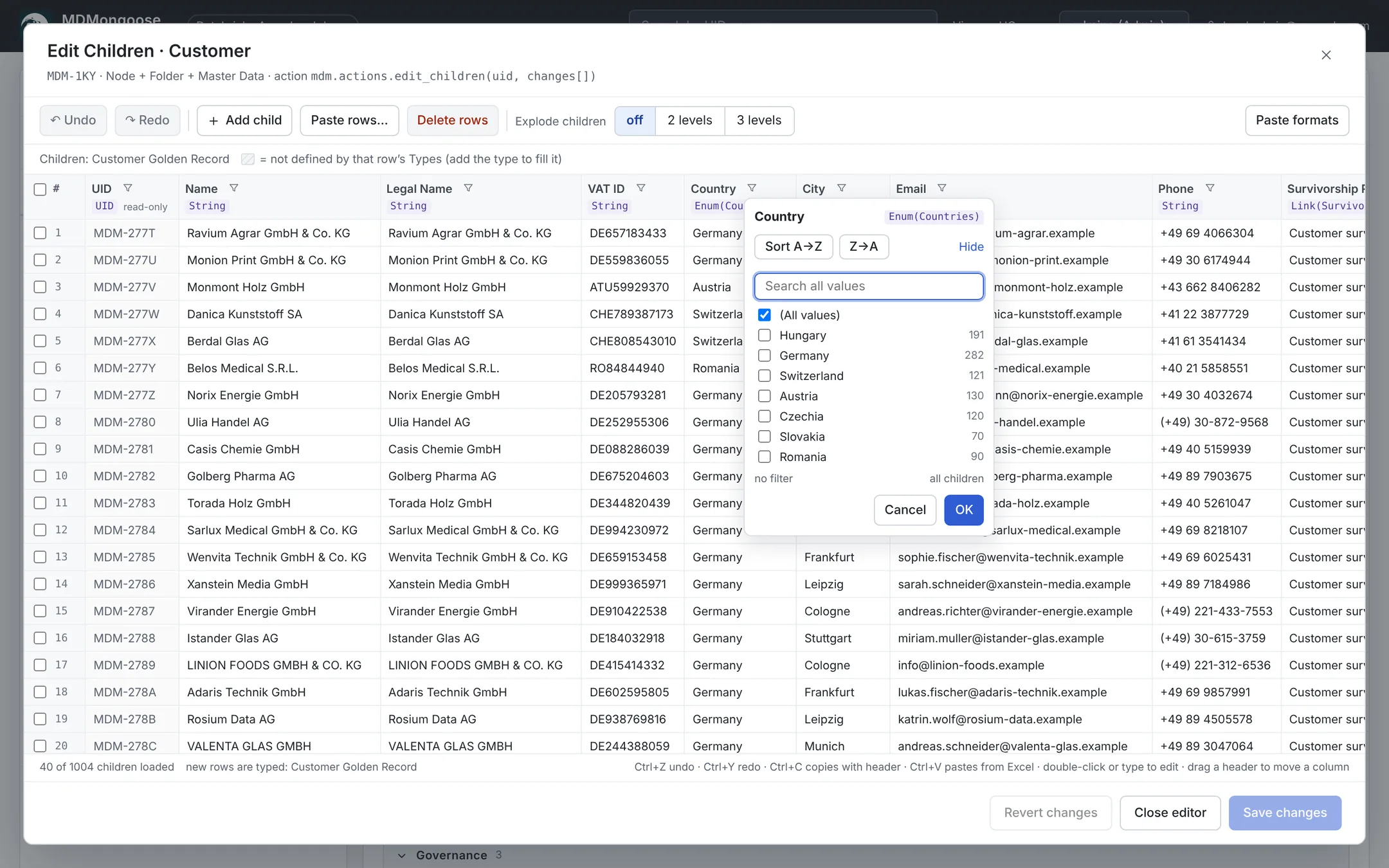
Click a column's filter button:
- Sort A→Z / Z→A — on child columns the sort runs on the server over all children.
- The value list shows the values of all children with counts (the first 40; search for more). Typing in the search ticks the matching values, so OK filters to them right away; (Select all search results) ticks or unticks all matches.
Editing
| Do this | How |
|---|---|
| Edit a cell | Double-click it, press Enter or F2, or just start typing |
| Move | Arrow keys, Tab / Shift+Tab; Shift+arrows extends the selection |
| Toggle a Boolean | Space or double-click |
| Clear cells | Delete or Backspace on a selection |
| Undo / redo | Ctrl+Z / Ctrl+Y (or Ctrl+Shift+Z), or the toolbar buttons |
| Add a child | Add child, or click the empty row at the bottom |
| Delete rows | Tick the rows (or select cells) and click Delete rows; click again to undo |
| Revert | Revert changes discards every unsaved change |
New rows are green, modified rows orange, deleted rows struck through. The footer counts them.
Copy and paste
Ctrl+C copies the selection with a header row; Ctrl+V pastes from Excel or CSV. A header row maps columns by name. With a UID column, a known UID updates that row; a UID that is not loaded is sent to the server, which updates the node if it is below this one and otherwise creates a new child. Paste rows… creates many children at once from pasted text.
| PropertyType | Copied as | Accepted on paste |
|---|---|---|
| String | ACME GmbH | any text |
| Number | 1200 | 1200, 1 200, 1,200 |
| Float | 1500.5 | 1500.5 or 1500,5 |
| Timestamp | 2026-11-15 09:30 | ISO, 2026.11.15., 15.11.2026, 15 Nov 2026, 20261115, Excel serial, Unix seconds… |
| Boolean | TRUE / FALSE | also yes/no, 1/0; empty = FALSE |
| Enum(X) | Germany | the value's name (any case) or its UID |
| Link(X) | Berlin | name or UID; use the UID if a name is not unique |
| Array(NodeType) | Germany, Austria | comma- or semicolon-separated names or UIDs |
| Array(String) | key account, eu | comma-separated; quote a value with a comma |
Values that do not parse or resolve stay as typed and turn red; Save is blocked until they are fixed.
Saving
Save changes validates everything on the server first. If any row fails, nothing is saved and the rows with errors are marked. If someone else changed one of the nodes since you loaded it, the save is refused — reload and apply your change again.
Tips
- Use Explode children on a Master Data node to correct golden records and check their source records side by side.
- To fill one property for many children, copy one cell, select the target cells in the column and paste.
- Big changes are easiest in Excel: copy the grid with headers, edit in Excel, paste back — the UID column makes every row update the right node.
- Corrected values become UserDefined — see Modifying data.
- Value formats for Enum, Link and Array cells are explained in Enum, Link and Array.