Exporting to CSV and Excel
Every node has an Export action that downloads it and its descendants as a CSV file or an Excel workbook, straight from the app.
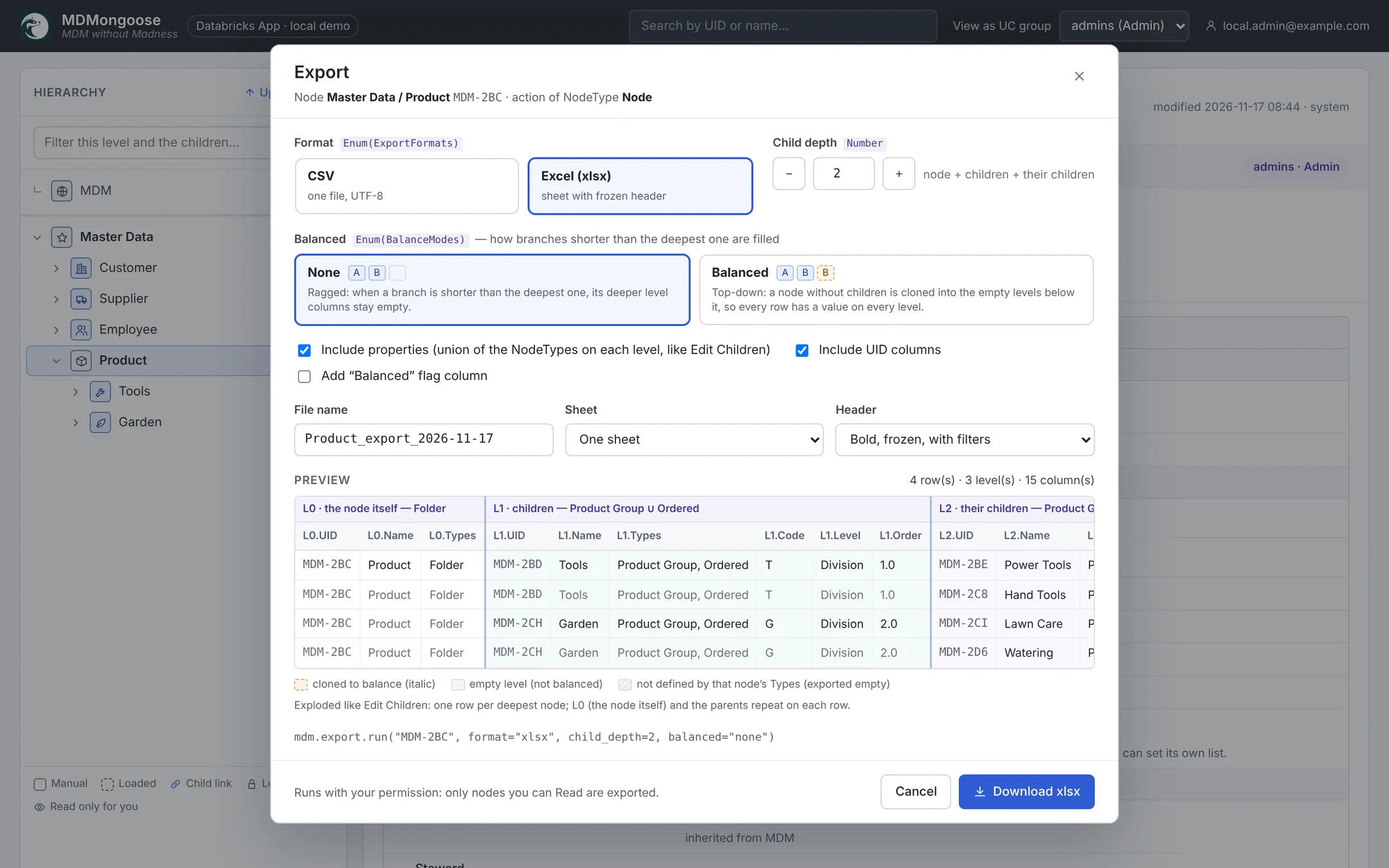
Options
| Option | Meaning |
|---|---|
| Format | CSV (one file) or Excel (xlsx). |
| Child depth | How many levels below the node to include (0–10). |
| Balanced | None: a branch shorter than the deepest one leaves its deeper columns empty. Balanced: a node without children is cloned into the empty levels, so every row has a value on every level. |
| Include properties | Adds the properties of each level — the union of the NodeTypes on that level, as in Edit Children. |
| Include UID columns | Adds an Ln.UID column per level. |
| Add "Balanced" flag column | Marks the rows that were filled by balancing. |
| File name | Defaults to <node>_export_<date>. |
| CSV: delimiter, encoding | Comma, semicolon or tab; UTF-8 with or without BOM (with BOM opens correctly in Excel). |
| Excel: sheet, header | One sheet or one sheet per level; a bold, frozen header with filters, or a plain one. |
The layout
The export looks like an exploded Edit Children grid: one row per deepest node, with L0 (the exported
node), L1 (its children), L2 … column groups, and the parents repeated on every row.
L0.UID   L0.Name   L1.UID   L1.Name      L1.Code  L2.UID   L2.Name
MDM-2BC  Product   MDM-2BD  Tools        T        MDM-2BE  Power Tools
MDM-2BC  Product   MDM-2BD  Tools        T        MDM-2C8  Hand Tools
MDM-2BC  Product   MDM-2CH  Garden       G        MDM-2CI  Lawn Care
The preview in the dialog shows the first rows with exactly these columns, and the legend explains the cell colours (cloned by balancing, empty level, property not defined by the node's types).
Good to know
- You export only what you can read: nodes without access for your groups are left out.
- Downloads are built by the app. Very large branches (the dialog shows the node count) are refused there — use the export job or the materialized views instead.
- The mdm_action job can write the same export to the
exportsvolume (/Volumes/<catalog>/mdm_core/exports) for scheduled or very large exports.